REST API는 웹 서비스에서 가장 널리 사용되는 아키텍처 스타일입니다. 잘 설계된 API는 사용하기 쉽고, 유지보수가 용이하며, 확장성이 뛰어납니다. 이 글에서는 REST API 설계의 모범 사례를 체계적으로 다루겠습니다.
REST 원칙
REST(Representational State Transfer)는 다음 원칙을 따릅니다.
- Stateless: 각 요청은 독립적이며, 서버는 클라이언트 상태를 저장하지 않음
- Client-Server: 클라이언트와 서버의 관심사 분리
- Uniform Interface: 일관된 인터페이스로 리소스 조작
- Cacheable: 응답은 캐시 가능 여부를 명시
- Layered System: 계층화된 시스템 아키텍처
HTTP 메서드
각 HTTP 메서드는 특정 동작에 매핑됩니다.
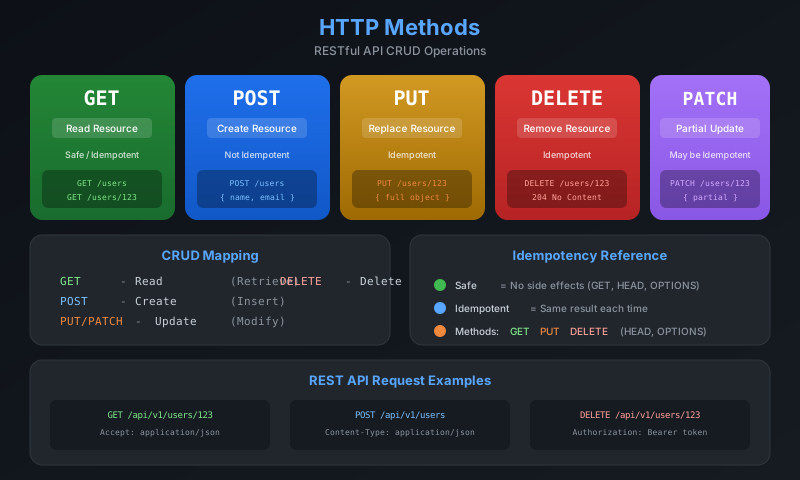
메서드별 사용법
| 메서드 | 용도 | 멱등성 | 안전성 |
|---|---|---|---|
| GET | 리소스 조회 | O | O |
| POST | 리소스 생성 | X | X |
| PUT | 리소스 전체 수정 | O | X |
| PATCH | 리소스 부분 수정 | X | X |
| DELETE | 리소스 삭제 | O | X |
**멱등성(Idempotency)**은 같은 요청을 여러 번 보내도 결과가 동일함을 의미합니다. GET, PUT, DELETE는 멱등하지만, POST는 그렇지 않습니다.
예제
# 모든 사용자 조회
curl -X GET https://api.example.com/users

# 특정 사용자 조회
curl -X GET https://api.example.com/users/123

# 사용자 생성
curl -X POST https://api.example.com/users \
  -H "Content-Type: application/json" \
  -d '{"name": "Kim", "email": "kim@example.com"}'

# 사용자 정보 수정 (전체)
curl -X PUT https://api.example.com/users/123 \
  -H "Content-Type: application/json" \
  -d '{"name": "Kim", "email": "new@example.com"}'

# 사용자 정보 수정 (부분)
curl -X PATCH https://api.example.com/users/123 \
  -H "Content-Type: application/json" \
  -d '{"email": "new@example.com"}'

# 사용자 삭제
curl -X DELETE https://api.example.com/users/123
URL 설계
좋은 URL 설계는 API의 사용성을 크게 높입니다.
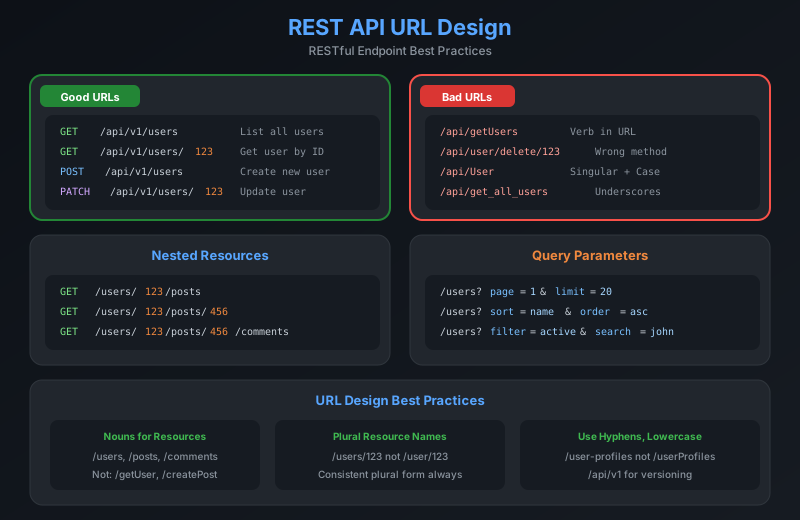
URL 설계 원칙
# 좋은 예
GET    /api/v1/users                 # 사용자 목록
GET    /api/v1/users/123             # 특정 사용자
POST   /api/v1/users                 # 사용자 생성
PUT    /api/v1/users/123             # 사용자 수정
DELETE /api/v1/users/123             # 사용자 삭제

# 나쁜 예
GET    /api/v1/getUsers              # 동사 사용
POST   /api/v1/createUser            # 동사 사용
GET    /api/v1/user                  # 단수형 사용
DELETE /api/v1/users/123/delete      # 중복 동사
중첩 리소스
# 사용자의 게시글
GET    /api/v1/users/123/posts
POST   /api/v1/users/123/posts
GET    /api/v1/users/123/posts/456

# 게시글의 댓글
GET    /api/v1/posts/456/comments
POST   /api/v1/posts/456/comments

# 깊은 중첩은 피하기 (3단계 이상)
# 나쁜 예
GET    /api/v1/users/123/posts/456/comments/789/likes

# 좋은 예
GET    /api/v1/comments/789/likes
URL은 **리소스(명사)**를 나타내고, HTTP 메서드는 **동작(동사)**을 나타냅니다. URL에 동사를 넣지 마세요.
쿼리 파라미터
# 페이지네이션
GET /api/v1/users?page=1&limit=20

# 정렬
GET /api/v1/users?sort=name&order=asc

# 필터링
GET /api/v1/users?role=admin&status=active

# 검색
GET /api/v1/users?q=kim

# 필드 선택
GET /api/v1/users?fields=id,name,email

# 조합
GET /api/v1/users?page=1&limit=20&sort=createdAt&order=desc&role=admin
HTTP 상태 코드
적절한 상태 코드는 클라이언트가 응답을 이해하는 데 도움을 줍니다.
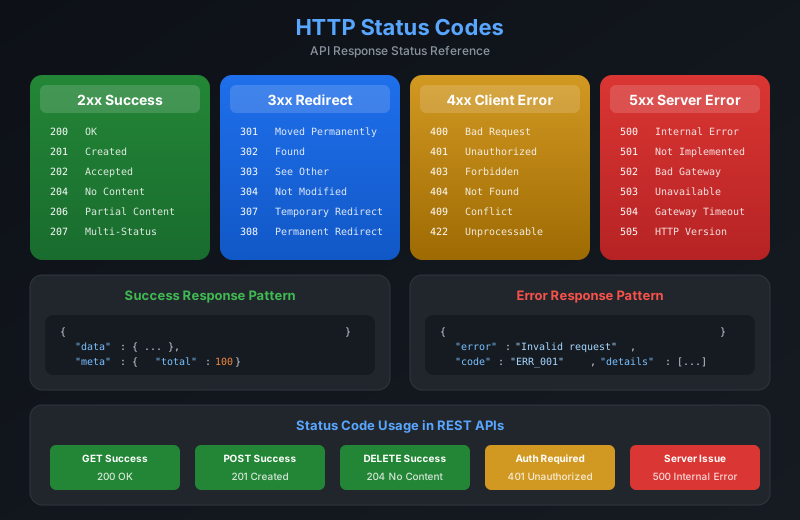
주요 상태 코드
2xx 성공
// 200 OK - 성공적인 조회/수정
{
  "data": {
    "id": "123",
    "name": "Kim",
    "email": "kim@example.com"
  }
}

// 201 Created - 리소스 생성 성공
// Location 헤더에 생성된 리소스 URL 포함
{
  "data": {
    "id": "124",
    "name": "Lee"
  }
}

// 204 No Content - 삭제 성공 (본문 없음)
4xx 클라이언트 오류
// 400 Bad Request - 잘못된 요청
{
  "error": {
    "code": "VALIDATION_ERROR",
    "message": "Invalid request body",
    "details": [
      { "field": "email", "message": "Invalid email format" }
    ]
  }
}

// 401 Unauthorized - 인증 필요
{
  "error": {
    "code": "UNAUTHORIZED",
    "message": "Authentication required"
  }
}

// 403 Forbidden - 권한 없음
{
  "error": {
    "code": "FORBIDDEN",
    "message": "You don't have permission to access this resource"
  }
}

// 404 Not Found - 리소스 없음
{
  "error": {
    "code": "NOT_FOUND",
    "message": "User with id '123' not found"
  }
}

// 422 Unprocessable Entity - 유효성 검증 실패
{
  "error": {
    "code": "UNPROCESSABLE_ENTITY",
    "message": "Validation failed",
    "details": [
      { "field": "age", "message": "Must be a positive number" }
    ]
  }
}
5xx 서버 오류
// 500 Internal Server Error - 서버 내부 오류
{
  "error": {
    "code": "INTERNAL_ERROR",
    "message": "An unexpected error occurred",
    "requestId": "req_abc123"
  }
}

// 503 Service Unavailable - 서비스 일시 중단
{
  "error": {
    "code": "SERVICE_UNAVAILABLE",
    "message": "Service is temporarily unavailable",
    "retryAfter": 30
  }
}
5xx 오류에서는 상세한 스택 트레이스를 노출하지 마세요. 보안 취약점이 될 수 있습니다. 대신 요청 ID를 반환하여 서버 로그와 연결하세요.
요청/응답 형식
요청 본문
// POST /api/v1/users
{
  "name": "Kim",
  "email": "kim@example.com",
  "password": "securePassword123",
  "profile": {
    "bio": "Hello, World!",
    "avatar": "https://example.com/avatar.jpg"
  }
}
응답 형식
// 단일 리소스
{
  "data": {
    "id": "123",
    "type": "user",
    "attributes": {
      "name": "Kim",
      "email": "kim@example.com",
      "createdAt": "2024-01-08T12:00:00Z"
    }
  }
}

// 컬렉션
{
  "data": [
    { "id": "123", "name": "Kim" },
    { "id": "124", "name": "Lee" }
  ],
  "meta": {
    "total": 100,
    "page": 1,
    "limit": 20,
    "totalPages": 5
  },
  "links": {
    "self": "/api/v1/users?page=1",
    "first": "/api/v1/users?page=1",
    "prev": null,
    "next": "/api/v1/users?page=2",
    "last": "/api/v1/users?page=5"
  }
}
인증과 보안
인증 방식
# API Key (헤더)
curl -H "X-API-Key: your-api-key" https://api.example.com/users

# Bearer Token (JWT)
curl -H "Authorization: Bearer eyJhbGciOiJIUzI1NiIs..." \
  https://api.example.com/users

# Basic Auth
curl -u username:password https://api.example.com/users
JWT 토큰 구조
// Header
{
  "alg": "HS256",
  "typ": "JWT"
}

// Payload
{
  "sub": "user123",
  "name": "Kim",
  "role": "admin",
  "iat": 1704700800,
  "exp": 1704787200
}

// Signature
HMACSHA256(
  base64UrlEncode(header) + "." + base64UrlEncode(payload),
  secret
)
보안 모범 사례
1. HTTPS 필수 사용
2. 민감한 데이터는 본문에 포함 (URL 제외)
3. Rate Limiting 적용
4. 입력 유효성 검증
5. CORS 정책 설정
6. 토큰 만료 시간 설정
7. 민감한 정보 응답에서 제외
버전 관리
URL 경로 버전
GET /api/v1/users
GET /api/v2/users
헤더 버전
curl -H "Accept: application/vnd.api+json; version=1" \
  https://api.example.com/users

curl -H "API-Version: 2024-01-08" \
  https://api.example.com/users
URL 경로 버전이 가장 직관적이고 널리 사용됩니다. 새 버전을 도입할 때는 이전 버전을 일정 기간 유지하고 마이그레이션 가이드를 제공하세요.
실전 예제
블로그 API 설계
# 게시글
GET    /api/v1/posts                 # 목록
GET    /api/v1/posts/:id             # 상세
POST   /api/v1/posts                 # 작성
PUT    /api/v1/posts/:id             # 수정
DELETE /api/v1/posts/:id             # 삭제

# 댓글
GET    /api/v1/posts/:id/comments    # 게시글의 댓글 목록
POST   /api/v1/posts/:id/comments    # 댓글 작성
PATCH  /api/v1/comments/:id          # 댓글 수정
DELETE /api/v1/comments/:id          # 댓글 삭제

# 태그
GET    /api/v1/tags                  # 태그 목록
GET    /api/v1/posts?tag=javascript  # 태그별 게시글

# 사용자
GET    /api/v1/users/:id/posts       # 사용자의 게시글
Express.js 구현
const express = require('express');
const app = express();

app.use(express.json());

const users = new Map();

app.get('/api/v1/users', (req, res) => {
  const { page = 1, limit = 20 } = req.query;
  const allUsers = Array.from(users.values());
  const start = (page - 1) * limit;
  const paginatedUsers = allUsers.slice(start, start + Number(limit));

  res.json({
    data: paginatedUsers,
    meta: {
      total: allUsers.length,
      page: Number(page),
      limit: Number(limit)
    }
  });
});

app.get('/api/v1/users/:id', (req, res) => {
  const user = users.get(req.params.id);

  if (!user) {
    return res.status(404).json({
      error: {
        code: 'NOT_FOUND',
        message: `User with id '${req.params.id}' not found`
      }
    });
  }

  res.json({ data: user });
});

app.post('/api/v1/users', (req, res) => {
  const { name, email } = req.body;

  if (!name || !email) {
    return res.status(400).json({
      error: {
        code: 'VALIDATION_ERROR',
        message: 'Name and email are required'
      }
    });
  }

  const id = Date.now().toString();
  const user = { id, name, email, createdAt: new Date() };
  users.set(id, user);

  res.status(201)
    .location(`/api/v1/users/${id}`)
    .json({ data: user });
});

app.delete('/api/v1/users/:id', (req, res) => {
  const deleted = users.delete(req.params.id);

  if (!deleted) {
    return res.status(404).json({
      error: {
        code: 'NOT_FOUND',
        message: `User with id '${req.params.id}' not found`
      }
    });
  }

  res.status(204).send();
});

app.listen(3000);
API 문서화
OpenAPI (Swagger) 예제
openapi: 3.0.0
info:
  title: User API
  version: 1.0.0

paths:
  /api/v1/users:
    get:
      summary: List all users
      parameters:
        - name: page
          in: query
          schema:
            type: integer
            default: 1
        - name: limit
          in: query
          schema:
            type: integer
            default: 20
      responses:
        '200':
          description: Success
          content:
            application/json:
              schema:
                type: object
                properties:
                  data:
                    type: array
                    items:
                      $ref: '#/components/schemas/User'

components:
  schemas:
    User:
      type: object
      properties:
        id:
          type: string
        name:
          type: string
        email:
          type: string
          format: email
마무리
잘 설계된 REST API는 개발 생산성과 사용자 경험을 크게 향상시킵니다. 핵심 포인트를 정리하면 다음과 같습니다.
- HTTP 메서드를 올바르게 사용 (GET, POST, PUT, PATCH, DELETE)
- 명사 기반 URL 설계, 복수형 사용
- 적절한 HTTP 상태 코드 반환
- 일관된 요청/응답 형식 유지
- 버전 관리와 문서화 필수
다음 글에서는 GraphQL과 REST의 비교 및 선택 가이드에 대해 다루겠습니다.