Linux는 서버 환경에서 가장 널리 사용되는 운영체제입니다. 개발자라면 기본적인 Linux 명령어를 숙지하고 있어야 합니다. 이 글에서는 실무에서 자주 사용하는 Linux 명령어를 체계적으로 정리합니다.
Linux 파일 시스템 구조
Linux의 모든 것은 파일입니다. 파일 시스템 구조를 이해하는 것이 첫 번째 단계입니다.
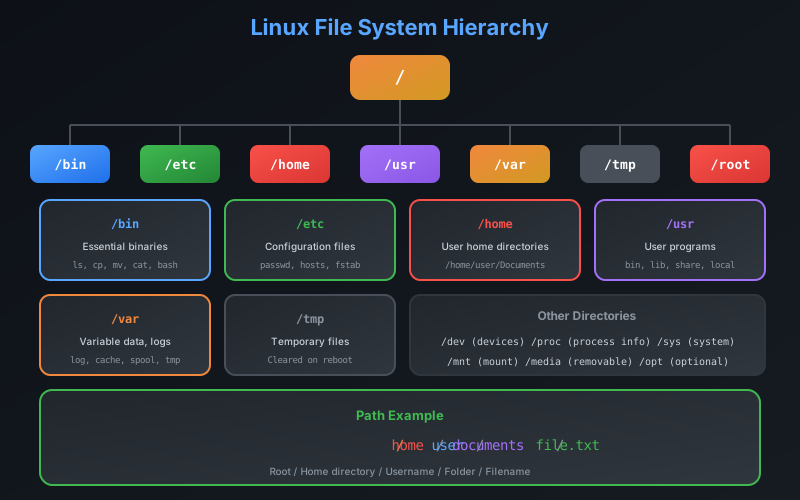
주요 디렉토리
| 디렉토리 | 설명 |
|---|---|
/ | 최상위 루트 디렉토리 |
/bin | 필수 실행 파일 |
/etc | 시스템 설정 파일 |
/home | 사용자 홈 디렉토리 |
/var | 가변 데이터 (로그 등) |
/tmp | 임시 파일 |
/usr | 사용자 프로그램 |
/opt | 추가 설치 프로그램 |
파일 및 디렉토리 조작
기본 명령어
pwd

cd /home/user
cd ..
cd ~
cd -

ls
ls -la
ls -lh

mkdir new_directory
mkdir -p parent/child/grandchild

rm file.txt
rm -r directory
rm -rf directory

cp source.txt destination.txt
cp -r source_dir destination_dir

mv old_name.txt new_name.txt
mv file.txt /new/location/
파일 내용 확인
cat file.txt

less file.txt

head -n 20 file.txt

tail -n 20 file.txt

tail -f /var/log/syslog

wc -l file.txt
wc -w file.txt
파일 검색
find /home -name "*.txt"

find . -type f -mtime -7

find . -size +100M

find . -name "*.log" -exec rm {} \;

locate filename

which python
whereis python
파일 권한 관리
Linux에서 권한 관리는 보안의 핵심입니다.
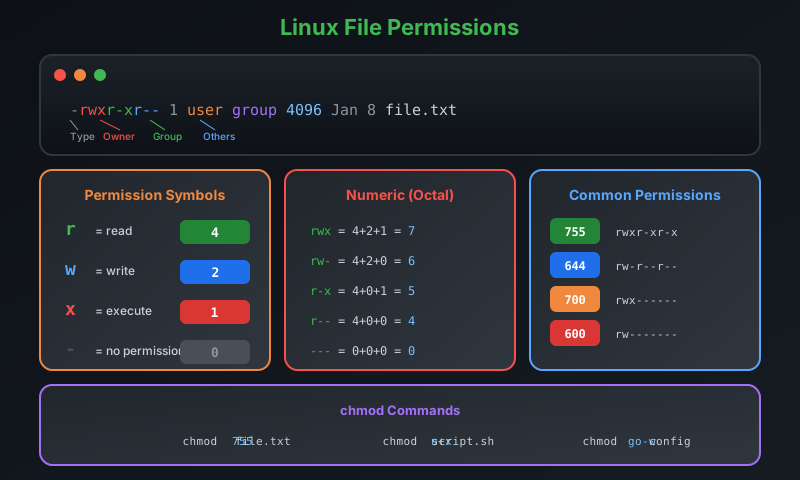
권한 변경
chmod 755 script.sh

chmod u+x file.sh
chmod g-w file.txt
chmod o-rwx file.txt

chmod -R 755 directory

chown user:group file.txt

chown -R user:group directory
스크립트 파일을 실행하려면 실행 권한(x)이 필요합니다.
chmod +x script.sh로 실행 권한을 부여하세요.권한 숫자 계산
| 권한 | 숫자 | 의미 |
|---|---|---|
| rwx | 7 | 읽기+쓰기+실행 |
| rw- | 6 | 읽기+쓰기 |
| r-x | 5 | 읽기+실행 |
| r– | 4 | 읽기 |
| -wx | 3 | 쓰기+실행 |
| -w- | 2 | 쓰기 |
| –x | 1 | 실행 |
| — | 0 | 권한 없음 |
텍스트 처리
grep - 패턴 검색
grep "pattern" file.txt

grep -i "pattern" file.txt

grep -r "pattern" directory/

grep -n "pattern" file.txt

grep -v "pattern" file.txt

grep -E "pattern1|pattern2" file.txt

grep -c "pattern" file.txt
sed - 스트림 편집
sed 's/old/new/' file.txt

sed 's/old/new/g' file.txt

sed -i 's/old/new/g' file.txt

sed -n '10,20p' file.txt

sed '/pattern/d' file.txt
awk - 텍스트 처리
awk '{print $1}' file.txt

awk -F',' '{print $1, $3}' file.csv

awk '{sum += $1} END {print sum}' numbers.txt

awk 'NR==5' file.txt

awk '/pattern/ {print $0}' file.txt
파이프와 리다이렉션
명령어를 연결하여 강력한 데이터 처리가 가능합니다.
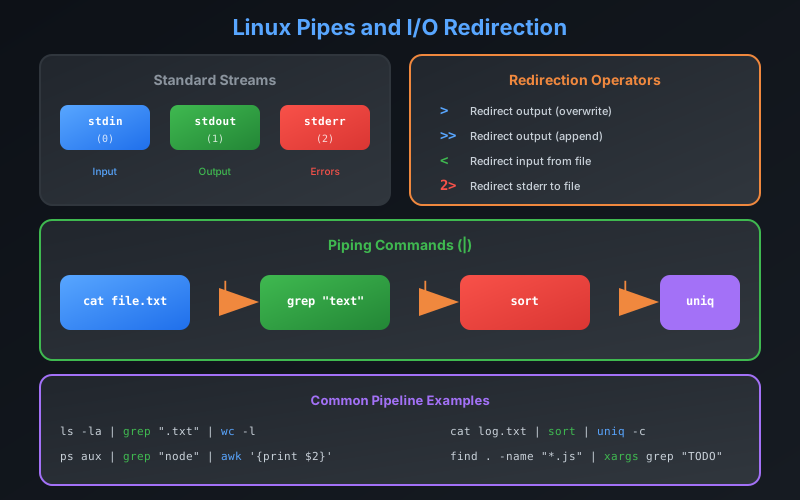
리다이렉션
echo "Hello" > file.txt

echo "World" >> file.txt

command < input.txt

command 2> error.log

command > output.txt 2>&1

command &> all_output.txt

command > /dev/null 2>&1
파이프
cat file.txt | grep "pattern" | sort | uniq

ps aux | grep nginx | head -5

cat access.log | awk '{print $1}' | sort | uniq -c | sort -rn | head -10

find . -name "*.js" | xargs grep "TODO"
rm -rf와 리다이렉션을 함께 사용할 때 주의하세요. 잘못된 명령은 중요한 데이터를 삭제할 수 있습니다.프로세스 관리
프로세스 확인
ps aux

ps aux | grep nginx

top

htop

pgrep nginx

pgrep -f "python script.py"
프로세스 제어
kill PID

kill -9 PID

killall process_name

pkill -f "pattern"

command &

nohup command &

nohup command > output.log 2>&1 &
작업 관리
jobs

command &

fg %1

bg %1

disown %1
시스템 정보
시스템 상태
uname -a

hostname

uptime

free -h

df -h

du -sh directory/

du -sh * | sort -rh | head -10
사용자 정보
whoami

id

who

last

w
네트워크 명령어
연결 확인
ping google.com

curl -I https://example.com

curl -X POST -d "data" https://api.example.com

wget https://example.com/file.zip

traceroute google.com

nslookup google.com
dig google.com
포트 및 연결
netstat -tuln

ss -tuln

lsof -i :8080

netstat -an | grep ESTABLISHED | wc -l
압축과 아카이브
tar
tar -cvf archive.tar directory/

tar -xvf archive.tar

tar -czvf archive.tar.gz directory/

tar -xzvf archive.tar.gz

tar -tzvf archive.tar.gz
기타 압축
gzip file.txt
gunzip file.txt.gz

zip -r archive.zip directory/
unzip archive.zip
유용한 조합 예제
로그 분석
tail -f /var/log/nginx/access.log | grep "ERROR"

cat access.log | awk '{print $9}' | sort | uniq -c | sort -rn

cat access.log | awk '$9 >= 400' | wc -l

cat access.log | awk '{print $1}' | sort | uniq -c | sort -rn | head -10
디스크 정리
find /tmp -type f -mtime +7 -delete

find . -name "*.log" -size +100M -exec rm {} \;

du -sh /var/log/* | sort -rh | head -10
파일 동기화
rsync -avz source/ destination/

rsync -avz -e ssh source/ user@server:/destination/

rsync -avz --delete source/ destination/
쉘 스크립트 기초
#!/bin/bash

name="World"
echo "Hello, $name!"

if [ -f "/path/to/file" ]; then
    echo "File exists"
else
    echo "File not found"
fi

for i in {1..5}; do
    echo "Number: $i"
done

count=1
while [ $count -le 5 ]; do
    echo "Count: $count"
    ((count++))
done

greet() {
    echo "Hello, $1!"
}
greet "User"
쉘 스크립트 파일은 첫 줄에
#!/bin/bash (shebang)를 추가하고, chmod +x script.sh로 실행 권한을 부여해야 합니다.마무리
Linux 명령어 숙달은 개발자의 생산성을 크게 높여줍니다. 핵심 포인트를 정리하면 다음과 같습니다.
- 파일 시스템 구조와 기본 명령어 숙지
- 권한 관리로 보안 유지
- 파이프와 리다이렉션으로 명령어 조합
- grep, sed, awk로 텍스트 처리
- 프로세스 관리와 시스템 모니터링
다음 글에서는 Linux 서버 보안 설정과 모니터링에 대해 다루겠습니다.