들어가며
JavaScript에서 비동기 프로그래밍은 필수입니다. API 호출, 파일 읽기, 타이머 등 많은 작업이 비동기로 처리됩니다. 이 글에서는 async/await를 중심으로 비동기 프로그래밍을 완벽하게 이해해보겠습니다.
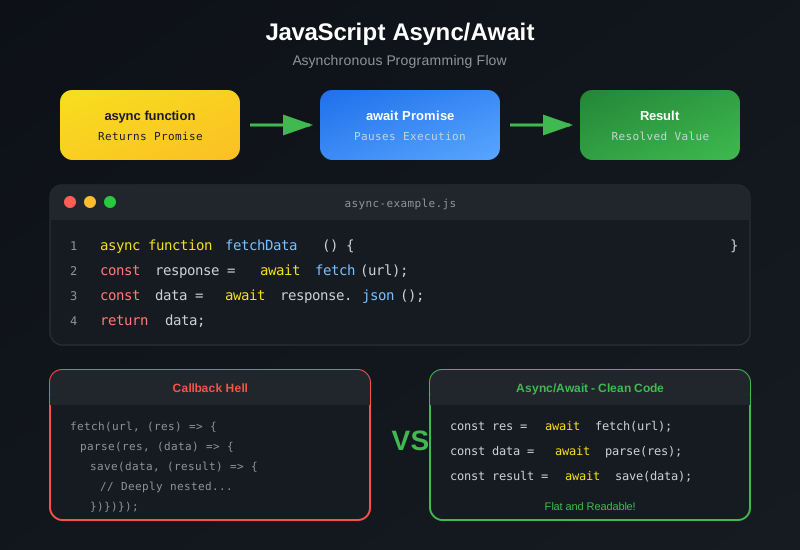
비동기 프로그래밍이란?
비동기 프로그래밍은 특정 작업이 완료될 때까지 기다리지 않고 다음 작업을 수행하는 방식입니다.
동기 vs 비동기
| 방식 | 특징 | 사용 사례 |
|---|---|---|
| 동기 | 순차적 실행, 블로킹 | 계산 작업, 파일 처리 |
| 비동기 | 병렬 실행, 논블로킹 | API 호출, I/O 작업 |
Promise 이해하기
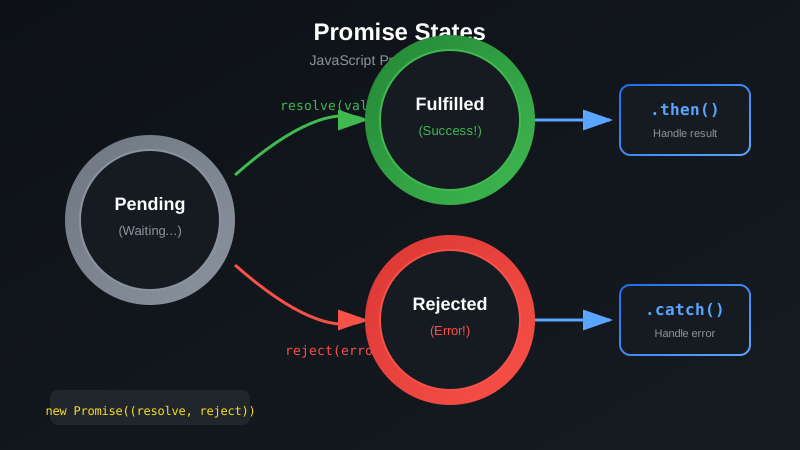
async/await를 이해하려면 먼저 Promise를 알아야 합니다.
Promise 생성
const myPromise = new Promise((resolve, reject) => {
  const success = true;

  if (success) {
    resolve("성공!");
  } else {
    reject("실패!");
  }
});
Promise 사용
myPromise
  .then(result => console.log(result))
  .catch(error => console.error(error))
  .finally(() => console.log("완료"));
async/await 기본
async/await는 Promise를 더 쉽게 사용할 수 있게 해주는 문법입니다.
async 함수 선언
async function fetchUserData() {
  return "사용자 데이터";
}
async 키워드를 붙이면 함수는 자동으로 Promise를 반환합니다.
await 사용
async function getData() {
  const response = await fetch("/api/data");
  const data = await response.json();
  return data;
}
await는 반드시 async 함수 내에서만 사용할 수 있습니다.이벤트 루프와 비동기
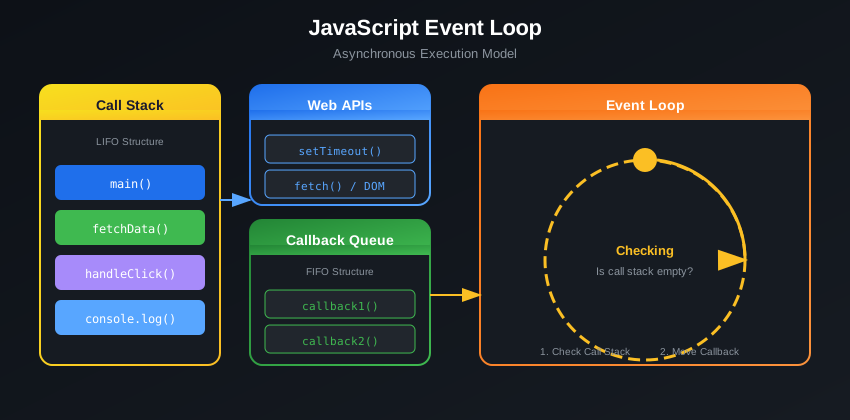
JavaScript의 비동기 처리를 이해하려면 이벤트 루프를 알아야 합니다.
이벤트 루프 구성요소
- Call Stack: 실행 중인 함수들이 쌓이는 곳
- Web APIs: 브라우저가 제공하는 API
- Callback Queue: 실행 대기 중인 콜백 함수들
- Event Loop: 스택이 비면 큐에서 콜백을 가져옴
에러 처리
try-catch 사용
async function fetchData() {
  try {
    const response = await fetch("/api/data");

    if (!response.ok) {
      throw new Error("HTTP error");
    }

    const data = await response.json();
    return data;
  } catch (error) {
    console.error("에러 발생:", error.message);
    throw error;
  }
}
여러 Promise 에러 처리
async function fetchMultiple() {
  try {
    const [users, posts] = await Promise.all([
      fetch("/api/users").then(r => r.json()),
      fetch("/api/posts").then(r => r.json())
    ]);
    return { users, posts };
  } catch (error) {
    console.error("하나 이상의 요청 실패:", error);
  }
}
병렬 처리
Promise.all
여러 비동기 작업을 동시에 실행합니다:
async function fetchAllData() {
  const [user, posts, comments] = await Promise.all([
    fetchUser(1),
    fetchPosts(1),
    fetchComments(1)
  ]);

  return { user, posts, comments };
}
Promise.race
가장 먼저 완료되는 Promise의 결과를 반환합니다:
async function fetchWithTimeout(url, timeout) {
  return Promise.race([
    fetch(url),
    new Promise((_, reject) =>
      setTimeout(() => reject(new Error("Timeout")), timeout)
    )
  ]);
}
Promise.allSettled
모든 Promise가 완료될 때까지 기다립니다:
async function fetchAll(urls) {
  const results = await Promise.allSettled(
    urls.map(url => fetch(url))
  );

  results.forEach((result, index) => {
    if (result.status === "fulfilled") {
      console.log(`${urls[index]}: 성공`);
    } else {
      console.log(`${urls[index]}: 실패`);
    }
  });
}
Promise.all은 하나라도 실패하면 전체가 실패합니다. 모든 결과가 필요하다면 Promise.allSettled를 사용하세요.실전 예제
API 데이터 가져오기
async function getUserWithPosts(userId) {
  const userResponse = await fetch(`/api/users/${userId}`);
  const user = await userResponse.json();

  const postsResponse = await fetch(`/api/users/${userId}/posts`);
  const posts = await postsResponse.json();

  return {
    ...user,
    posts
  };
}
순차적 API 호출
async function processItems(items) {
  const results = [];

  for (const item of items) {
    const result = await processItem(item);
    results.push(result);
  }

  return results;
}
재시도 로직
async function fetchWithRetry(url, maxRetries = 3) {
  for (let i = 0; i < maxRetries; i++) {
    try {
      const response = await fetch(url);
      return await response.json();
    } catch (error) {
      if (i === maxRetries - 1) throw error;
      await new Promise(r => setTimeout(r, 1000 * (i + 1)));
    }
  }
}
재시도 간격을 점진적으로 늘리는 방식을 지수 백오프(Exponential Backoff)라고 합니다.
흔한 실수들
1. await 없이 Promise 사용
async function wrong() {
  const data = fetch("/api/data");
  console.log(data);
}

async function correct() {
  const response = await fetch("/api/data");
  const data = await response.json();
  console.log(data);
}
2. 불필요한 순차 실행
async function slow() {
  const a = await fetchA();
  const b = await fetchB();
  return [a, b];
}

async function fast() {
  const [a, b] = await Promise.all([
    fetchA(),
    fetchB()
  ]);
  return [a, b];
}
마치며
async/await는 JavaScript 비동기 프로그래밍을 훨씬 직관적으로 만들어줍니다. Promise를 기반으로 하지만 동기 코드처럼 읽기 쉬운 코드를 작성할 수 있습니다. 에러 처리와 병렬 처리 패턴을 잘 활용하여 효율적인 비동기 코드를 작성해보세요.
참고 자료
- MDN Web Docs - async function
- JavaScript.info - Async/Await